Quilva for screenwriters

Break the story. Then write the script.

Industry-standard screenplay formatting, a two-way bridge with Final Draft, and the planning room most script software leaves out — cards, timelines, a story bible and a scene-by-scene Compass, all in one offline app.

● Opens & saves .fdx
● Fountain import & export
● One-time purchase
12.

14INT. HARBOUR MASTER'S OFFICE - NIGHT

Rain hammers the window. ELENA (40s, soaked, furious) slaps a waterlogged ledger onto the desk.

Elena

(quietly)

You signed for a ship that never came in. Tell me where it went.

Harbour Master

Some cargo's safer at the bottom of the sea.

Cut to:

15EXT. NORTH PIER - CONTINUOUS

A single light swings over black water.

Tab · Enter · done
Formatted by default
Tab and Enter do the work. Scene headings, action, character, dialogue, parentheticals and transitions land exactly where they belong.
Final Draft, both ways
Import and export .fdx with your acts, sequences, scene names, synopses and notes intact — so Quilva sits happily alongside the industry standard.
A writers' room built in
Beat it out on cards, run A-, B- and C-stories on parallel tracks, and keep every character and location in one living story bible.

Everything a script needs, before and after FADE IN.

Most screenwriting software is a very good typewriter. Quilva is that — and the corkboard, the whiteboard, the story bible and the print shop around it.

01

Script mode — correct by default

A rigid, purpose-built screenplay editor that keeps you in the flow. You think about the scene; Quilva thinks about margins, capitals and element order.

  • Tab cycles Scene Heading → Action → Character → Dialogue
  • Enter is context-smart; Shift+Enter drops in a parenthetical
  • Scene headings and character names auto-capitalise and autocomplete
  • Courier Prime plus six script faces on the same metric — one page, one minute
  • Up to four versions of every scene, each with its own status
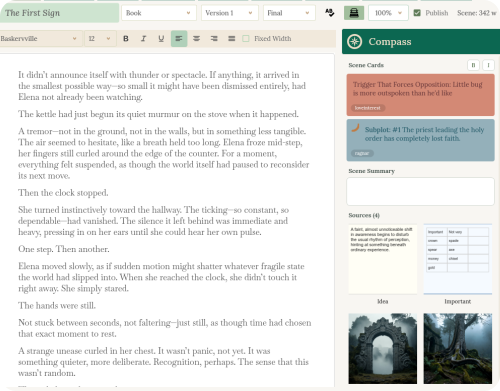
Quilva's Writer in screenplay mode with the Compass
02

Final Draft — a real two-way bridge

Quilva reads and writes Final Draft's own structure rather than guessing at it. The Story Map's act and sequence strips become your outline; your outline goes back out as clean, non-overlapping strips.

  • File → Import → Final Draft Script, with a guided wizard
  • Acts, sequences, scene names and synopses come across
  • ScriptNotes become Quilva comments, anchored to the exact words
  • Export back to .fdx with title page and SmartType filled in
  • Fountain import and export for plain-text workflows
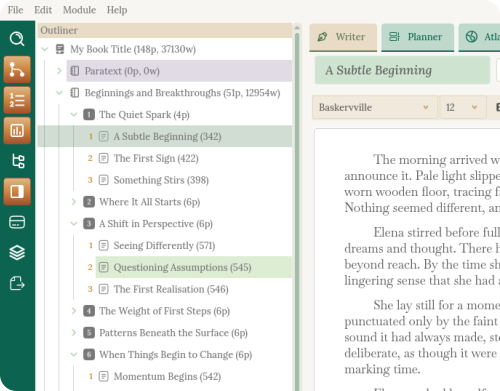
Act, sequence and scene structure in the Outliner
03

Planner — beat it out

Your corkboard and index cards, without the pins. Spread beats across the table, colour-code them by thread or character, and rearrange the whole second act with a drag.

  • Colour-coded cards with icons and tags for every beat
  • A free Work Area for scenes that don't have a home yet
  • Stacks to drop in whole structures at once
  • Rename the levels — Screenplay → Act → Sequence → Scene
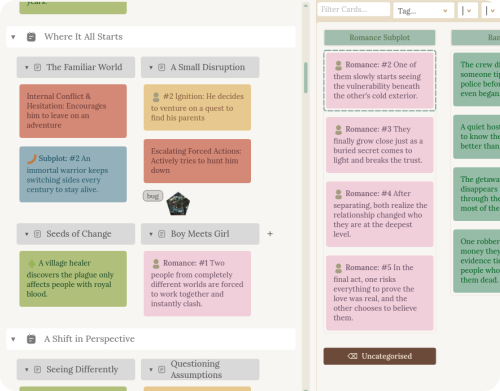
Planner corkboard with colour-coded cards
04

Timeline — A, B and C stories

Lay your threads out like an editor's timeline. See where the B-story goes quiet for twenty pages, where two arcs collide, and test a restructure without touching the script.

  • Parallel tracks for plot, subplots and character arcs
  • Tag-driven strips that organise themselves
  • As many timelines as you need — by character, location, theme
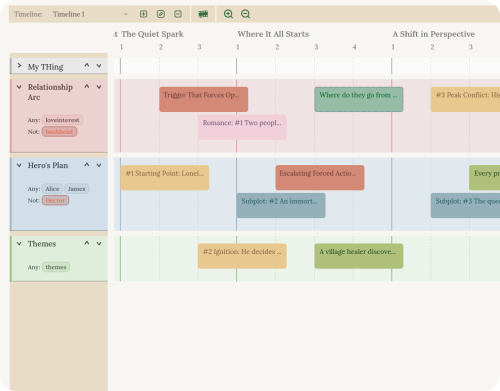
Multi-track story timeline
05

Atlas — your series bible

Characters, locations and organisations with rich profiles — and Quilva tracks every appearance across the script, so you always know when you last saw someone.

  • Profiles for every character, location and thread
  • Appearances tracked across scenes, acts and whole series
  • Icons that follow a character through the planner and Compass
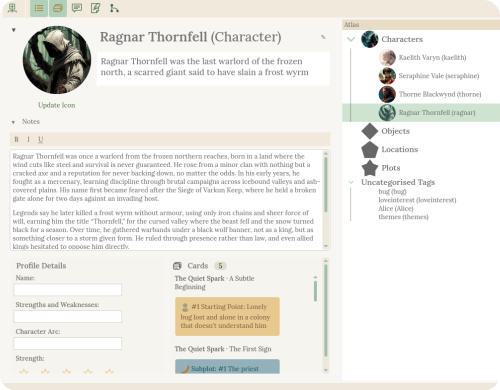
Atlas story bible
06

Publisher — from draft to reader

Clean screenplay PDFs on A4 or US Letter in a click, plus the documents that get a project read: a treatment, a reading copy for notes, and the formats producers ask for.

  • Screenplay PDFs with title page — Quick Publish with Ctrl+P
  • Final Draft (.fdx) and Fountain export
  • Treatment export — a polished PDF overview of your structure for pitches
  • A single web page for readers, who can add comments you import straight back
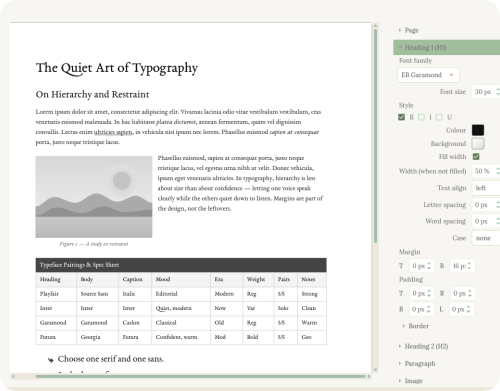
Quilva Publisher

From the room to the read.

Use as much or as little of Quilva as you like. Here's how a script typically travels through it.

Break the story

Beat out acts and sequences on cards in the Planner or Bubbles. Every card already knows where it lives in the outline.

Map the threads

Check pacing on the Timeline and keep characters and locations straight in the Atlas.

Write the pages

Draft in Script mode with the Compass beside you — the scene's beats, notes and summary always in view.

Share and polish

Export a PDF, a treatment or a reader copy — or take it into Final Draft and bring it back again.

Keep what you love. Add what you've been missing.

You don't have to choose. Plan in Quilva, polish in Final Draft, and bring it home again — the round trip is built to hold your structure together.

What comes with you

Open your existing .fdx and keep working.

  • Every screenplay element, mapped one-for-one
  • Story Map acts and sequences as your outline
  • Scene titles, synopses and act descriptions
  • ScriptNotes as comments, on the exact words they marked
  • A clean .fdx back out whenever you need it

What you gain

The planning and publishing tools a typewriter can't give you.

  • Corkboard, mind map and multi-track timeline
  • A living story bible that tracks every appearance
  • The Compass: beats, notes and research beside every scene
  • Prose and screenplay versions of a story in one project
  • Treatments, reader copies and an authorship certificate
  • A one-time price, fully offline
The honest bit: Quilva doesn't do dual dialogue yet — side-by-side speeches from an .fdx arrive as ordinary stacked dialogue. Final Draft also re-paginates a script to its own metrics when it opens it, so page lengths can shift slightly between the two programs.
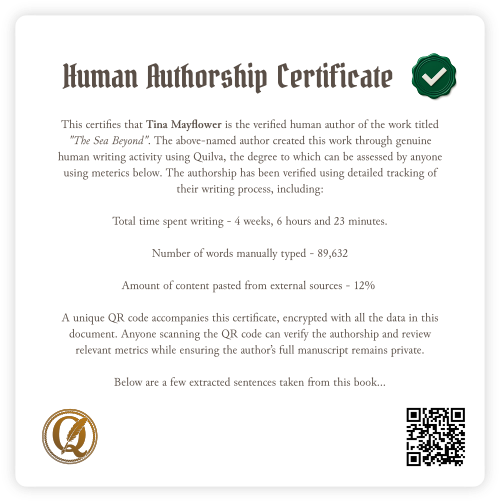
Human Authorship Certificate
❋ For scripts too

Show the script is yours.

Quilva quietly notices how you write — keystrokes, pauses, rewrites — and can add a Human Authorship Certificate page to your screenplay PDF: a QR code anyone can scan to see the work was written by a person.

Your pages never leave your computer until you choose to share them.

How the certificate works →

The honest answers.

Can Quilva open my Final Draft scripts?

Yes. File → Import → Final Draft Script reads .fdx files, including the Story Map's act and sequence strips, scene titles, synopses and ScriptNotes. File → Export → Final Draft (.fdx) writes them back. It has round-tripped reliably in testing; as with any two programs, give an important script a quick look after the trip.

Is the formatting industry standard?

Script mode follows standard screenplay layout on the Courier Prime metric, so a page approximates a minute of screen time. You can switch between Courier Prime and Quilva's script faces without changing line lengths or page count. Screenplay PDFs are limited to A4 and US Letter, as they should be.

Does it support Fountain?

Yes — import a .fountain script with a wizard that groups scenes into acts and sequences for you, and export to Fountain from the Publisher's Screenplay mode.

Can I write the novel and the screenplay in one project?

Yes. Every scene can hold both a prose and a screenplay version that share one outline, cards and story bible. Switch between Book and Script mode in the Writer whenever you like.

Does Quilva do dual dialogue?

Not yet. Dual-dialogue blocks from Final Draft are imported as ordinary stacked character and dialogue lines.

Which edition do I need?

Standard includes the complete Writer with Script mode, the Planner, Bubbles and Timeline, and screenplay PDFs. Pro adds the Atlas, the Designer, press-ready publishing and the Human Authorship Certificate. The free demo has every tool, so try it first.

Bring a script. See how it feels.

The free demo includes every tool and never expires. Import an .fdx or .fountain file and break it down in minutes.