N
N S W E
A writer's compass — v1.0

Sculpt your story, your way.

The complete offline desktop suite for novelists and screenwriters. Plan with cards, write with focus, design like a professional, and prove — with a single QR — that the words are yours.

One-time purchase
Works fully offline
Mac · Windows · Linux
Compass
Scene Cards
BI
Elena: #1 The Letter (memory)
Another card
The confrontation in Act III
Subplot beat — promise kept
Scene Summary
A quiet beginning. Elena wakes to a feeling she can't quite name…
Plan like no other
Colour-coded cards you can drag, drop and restructure. Timelines from any angle. An Atlas that tracks every character. Unmatched, by a mile.
Write with focus
A distraction-free editor in two modes — novel or screenplay with full Hollywood formatting. The Compass quietly serves up what you need, scene by scene.
Publish beautifully
Designer and Publisher work in lockstep — design and content linked but separate. Polished templates included; make your book look the way it deserves to.

Download Quilva 1.0

One application. Three platforms. Your license travels across up to three devices, and your work never leaves your machine without your say-so.

The download is the complete app. Without a license it runs forever in demo mode — watermarked exports, 20-scene limit. Add a key any time to remove every limit.
Quilva runs on Mac, Windows and Linux
Human Authorship Certificate
❋ Industry first

Prove your work is human-written.

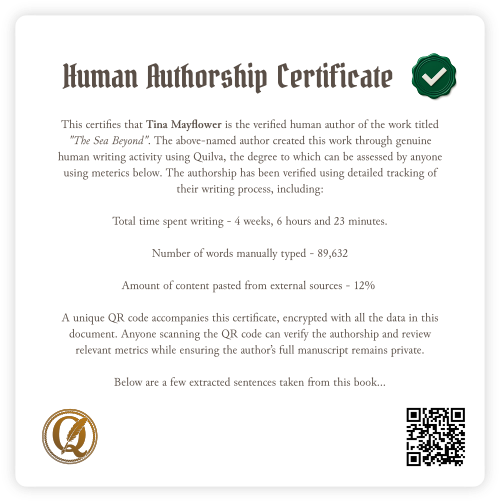
In a world flooded with AI-generated books, Quilva quietly notices how you write — your keystrokes, edits, pauses, time at the keyboard — and folds it all into an encrypted QR code anyone can scan to verify your authorship.

Your manuscript never leaves your computer until you choose to share it. A quiet, confident way to say: I actually wrote this.

Verifiable proof Scannable QR Stays private Tamper-evident

Everything you need, nothing you don't.

From first spark to final proof, every part of the writing journey lives inside a single, non-destructive workspace. Switch hats; never switch apps.

01

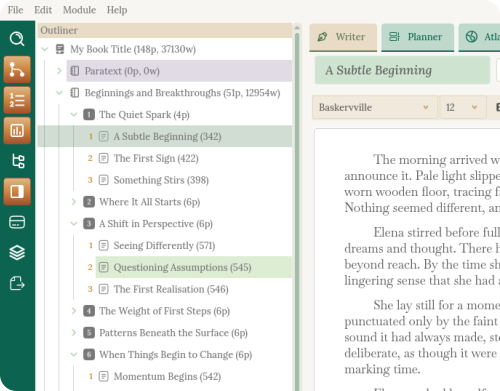
Outliner — the spine

The structural spine of your project. Drag, drop, rename, rearrange — and watch every other part of Quilva update in real time. Build a whole act of chapters in a single keystroke.

  • Collapsible tree view of your entire project
  • Fully customisable hierarchy — Book, Screenplay, Series, your choice
  • Bulk-create chapters and scenes in one go
  • Drag-and-drop reorganisation that ripples everywhere
Outliner
02

Planner — your corkboard

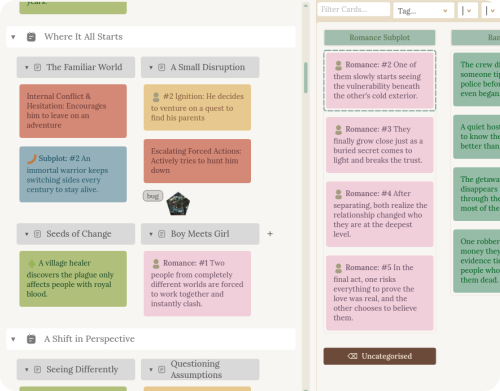
A digital corkboard where your story comes to life. Spread colourful cards across the table, arrange beats by hand, and feel the shape of your novel before you write a word.

  • Beautiful card-based planning
  • Ten theme colours, icons, and tags on every card
  • Free-form Work Area for ideas without a home yet
  • Bulk-create whole sets of cards with Stacks
Planner
03

Bubbles — a living mind map

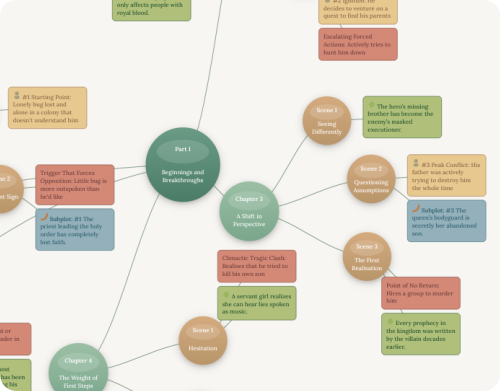
Your story as a living mind map. Hit Tab to grow ideas, Alt-click to move whole branches in a single gesture. Restructuring stops feeling like file management and starts feeling like sculpting.

  • Visual, non-linear thinking on an open canvas
  • Tab key builds structure at lightning speed
  • Alt-click to re-parent whole branches instantly
  • Collapse subplots out of sight when you need to focus
Bubbles
04

Timeline — parallel tracks

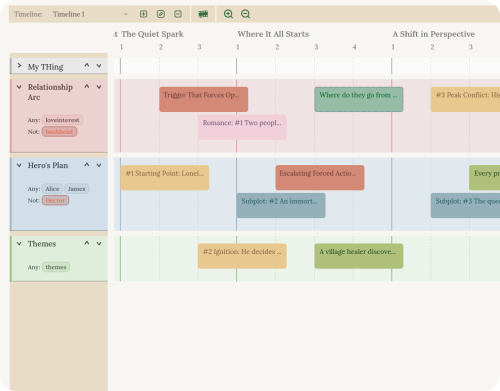
Like a video editor for your story. Run main plot, subplots, and character arcs on parallel tracks and spot pacing problems at a glance. Build as many timelines as you want — all driven by the same underlying cards.

  • Multi-track view of plot, subplots, and arcs
  • Smart tag-based strips that organise themselves
  • As many named timelines as your story needs
  • Drag cards to test radical chronological changes safely
Timeline
05

Atlas — your world bible

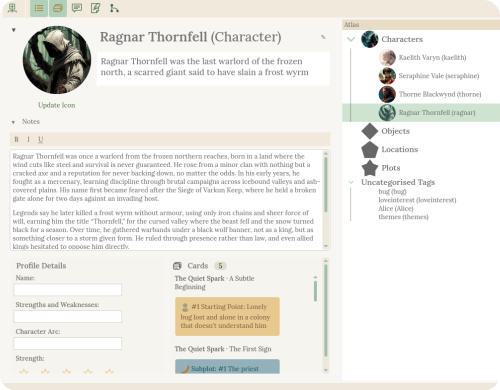
Your story's living world bible. Build rich profiles for every character, place, and idea — then watch the Atlas track every appearance across your entire manuscript, automatically.

  • Profiles for characters, locations, organisations, themes
  • Custom icons that act as clickable hyperlinks anywhere
  • Live tracking of every mention in your prose
  • Analyse a character across an act or your whole series
Atlas
06

Sources — your private vault

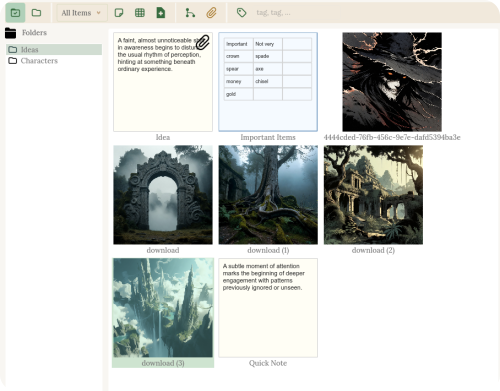
Your private vault. Notes, tables, images, and PDFs all live inside the project file — never lost, never broken, always there. Email your project and your whole research library travels with it.

  • Notes, tables, images, and PDFs embedded in your project
  • Link any source to any part of your story
  • Research surfaces exactly where you need it
  • Nothing in the cloud, nothing to break
Sources
07

Writer & Compass — a place to write

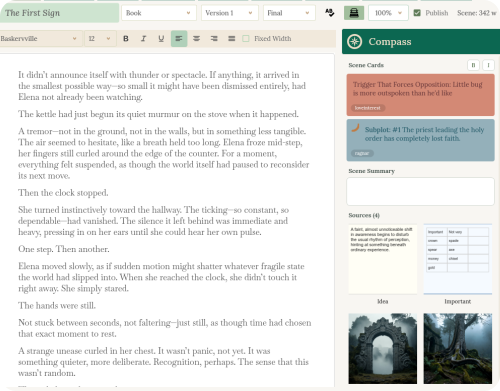
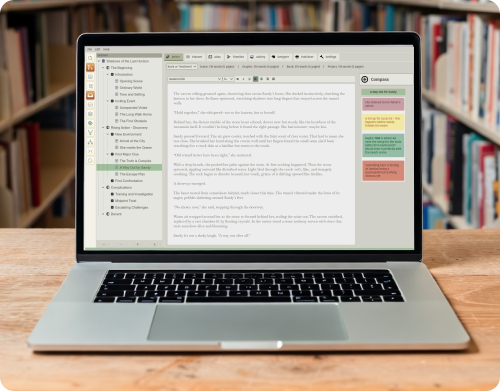
A calm, beautiful place to write — for both prose and screenplays. The Compass sidebar quietly hands you the cards, notes, and characters for the scene you're writing, so all your planning travels with you onto the page.

  • Clean prose editor and industry-standard screenplay mode
  • Up to four versions of every scene — experiment freely
  • Compass sidebar surfaces your planning, scene by scene
  • Retreat mode (Ctrl+R) for total focus when you need it
Writer and Compass
08

Designer — layout like a pro

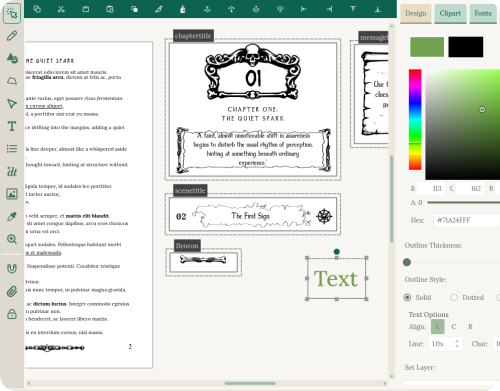
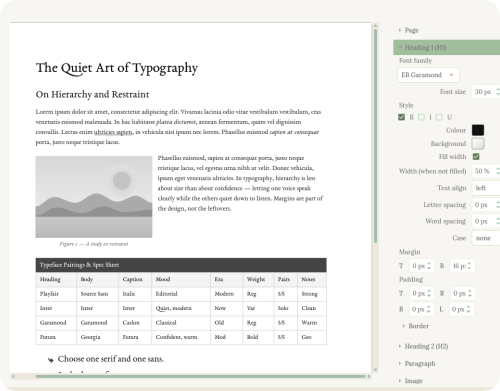
Professional book layout, built right in. Design beautiful pages that stay perfectly in sync with your manuscript — edit a paragraph, and the design updates itself. No more juggling separate apps.

  • Vector-based page design like Illustrator, tailored for books
  • Dynamic text that auto-fills chapter titles and page numbers
  • Frames for ornaments, illustrations, and scene dividers
  • 200+ hand-picked, commercially licensed fonts included
Designer
09

Publisher — ship it

From manuscript to finished book in a few clicks. Quick PDFs for beta readers, press-ready PDFs for the printer, Word and Fountain exports for agents and producers — all from one place.

  • Quick Publish (Ctrl+P) for instant, clean PDFs
  • Press-ready PDF compilation driven by the Designer
  • Export to Word (.docx) and Fountain for screenplays
  • No cloud, no subscription — your whole studio in one file
Publisher

Pay once. Keep it.

No subscriptions, no surprises. Try the demo forever — upgrade only when you're ready.

Free Demo

$0
forever, no card needed
  • All writing and publishing tools
  • No credit card, no email required
  • No expiration date
  • Watermarked exports
  • 20,000-word, 20-scene limits
  • Remove limits with a free trial key
Download free demo

Pro

$99
one-time, forever yours
  • Everything in Standard
  • Atlas — story world bible
  • Designer for total control
  • Publisher — press-ready PDFs
  • Human Authorship Certificates
  • Stack templates for plots & arcs
  • Clipart and extended fonts
  • Priority support
Get Quilva Pro

A free trial key, on the house.

Experience the full power of Quilva Standard or Pro with no credit card required. 15 uses, no watermarks, every feature unlocked.

Get started, comfortably.

Depending on whether you like to read, watch, or dig deep.

i

The Writer's Compass (PDF)

A 60-page eBook walking you through the main features and workflows of Quilva. A light, introductory read, perfect for Quilva beginners.

Download free ebook →
ii

Video Tutorials

From quick tips to in-depth feature walkthroughs, our video library helps visual learners get the most out of Quilva.

Watch on YouTube →
iii

Documentation

Searchable, regularly updated docs with detailed technical information, references, and community-contributed tricks.

View documentation →

A writer's compass, made by people who write.

Our mission

Quilva exists for writers who care about the craft — the ones chasing real stories, real characters, and real creativity in a world obsessed with speed and disposable content. We support people who choose to create something genuinely human, and we focus on the features writers actually need.

Why Quilva

Traditional writing software forces a choice between simplicity and power. Quilva offers both. The story planning tools are simple yet incredibly intuitive. The integrated Designer means you never switch apps. Everything from idea to publication lives in one place — making your whole process more efficient.

Built for writers

We've talked to novelists and screenwriters to understand what they really need: planning tools that feel intuitive, and a compass to keep them on track when actually writing. Quilva combines the best ideas from other programs and gives writers what they've always wanted — but couldn't quite put into words.

The honest answers.

What makes Quilva unique?

Quilva gives writers full control over planning and production in one place. You get a colour-coded card planner and a strip-based timeline for scenes, subplots, and arcs, plus traditional index cards and outlining tools. Your structure links directly into an integrated Designer and Publisher, so you can shape the look of your book as you write. It's a single, non-destructive workspace that covers planning, writing (books and screenplays), layout, publishing, and even optional authorship verification.

Which operating systems does Quilva support?

Quilva runs natively on Windows, macOS, and Linux. All platforms have identical features and capabilities. We recommend running the demo and/or trial version before purchasing, especially on Linux, where distributions can vary. Minimum 8GB RAM recommended, around 350MB disk space required.

What's the difference between Standard and Pro?

The Standard Edition includes all core writing and planning tools plus a basic Publisher. The Pro Edition adds the Designer for full control over interior design, page layout, and press-ready PDFs. Pro also unlocks Human Authorship Certificates, which the Standard Edition lacks.

Can the Authorship Certificate QR code be cheated?

In short, no — it's not practical. Quilva tracks your real writing habits (how fast you type, pauses, deletions, rewrites, what you wrote yourself vs. copy-pasted) and stores all that data, encrypted, right inside the .qlv file itself. Even we can't read your manuscript — you can prove it by using the app fully offline. When you generate a certificate, only tiny snippets plus the behavioural data get compressed and locked into a QR code. The server is the only thing that can decrypt it. The only way around it would be to slowly re-type the AI-generated book by hand over weeks or months, perfectly imitating real human messiness. So much effort that practically nobody will bother.

Does Quilva work offline?

Absolutely. Quilva is a fully offline desktop app. The website never tracks your writing or personal data, and you can even activate your license without an internet connection. We value user privacy and ownership, which is why there's no subscription. QR authentication was designed around these values so writers can prove the authenticity of their work without storing or sharing it online.

How advanced is the Designer?

Think of the Designer as a stripped-down version of Illustrator or CorelDRAW, tightly linked to your book's structure. It's not a full replacement for those programs, but it gives writers and self-publishers every tool relevant to book interior design. Because the Writer and Designer are dynamically linked, design changes propagate automatically, and structural changes (adding chapters, reordering scenes) are completely non-destructive to your layout.

How does the Timeline work?

The Timeline displays your story cards on horizontal strips, similar to a video editor. You can create separate tracks for different subplots or character arcs, then drag events to reorder your narrative visually — letting you see your story from new angles or isolate plots for clarity.

Is there a free trial available?

Yes. Quilva runs in a non-expiring demo mode with word count limits and watermarked exports. A free trial license removes these limits for 15 uses, letting you fully explore the Designer and Publisher features of Pro without watermarks. You can get an instant trial key for free on this page.

Can I upgrade from Standard to Pro later?

Yes. You can upgrade any time by paying the difference. Email support with your receipt or current license key and we'll happily assist.

Is there a student discount?

We evaluate free or discounted licenses on an individual basis and have supported people with free licenses before. Write to us about your situation and we'll do what we can. There's no guarantee, but we try to help where we reasonably can.

How do software updates work?

Download and install the latest version from the website whenever you like. Your license includes all updates within the same major version — 1.0, 1.2, 1.4, and so on. These updates are yours permanently. Version 2.0 and beyond would require a new license if you've only bought version 1.

What export formats does Quilva support?

Quilva exports to PDF, DOCX, and EPUB for books, and .fountain and PDF for screenplays.

Can I use custom fonts?

Quilva comes with roughly 200 curated fonts, organised to help you quickly find what you need. You can also add your own — the documentation explains how.

What kind of support is included?

All purchased licenses include email support, usually with a response within 48 hours. Including your license in support emails tends to bump you to the top of the queue.

Can I get a refund?

Because of how our licensing system works, we can't de-activate a license once it's activated — especially if there's a copy running offline. Our demo and free trial allow thorough testing of every feature before purchase, so we don't offer refunds.
Questions? We answer.

Real humans, usually within 48 hours. We read every message.

Drop a note about a feature request, a bug, a discount enquiry, or just to say hello. We try to reply within two business days — usually faster.

Include your license key in support emails for priority handling.

"Writing software shouldn't get in the way. It should get out of the way."